
Download CalcService – Free In‑Line Text Calculator for Windows, Mac, Android & iOS
Overview
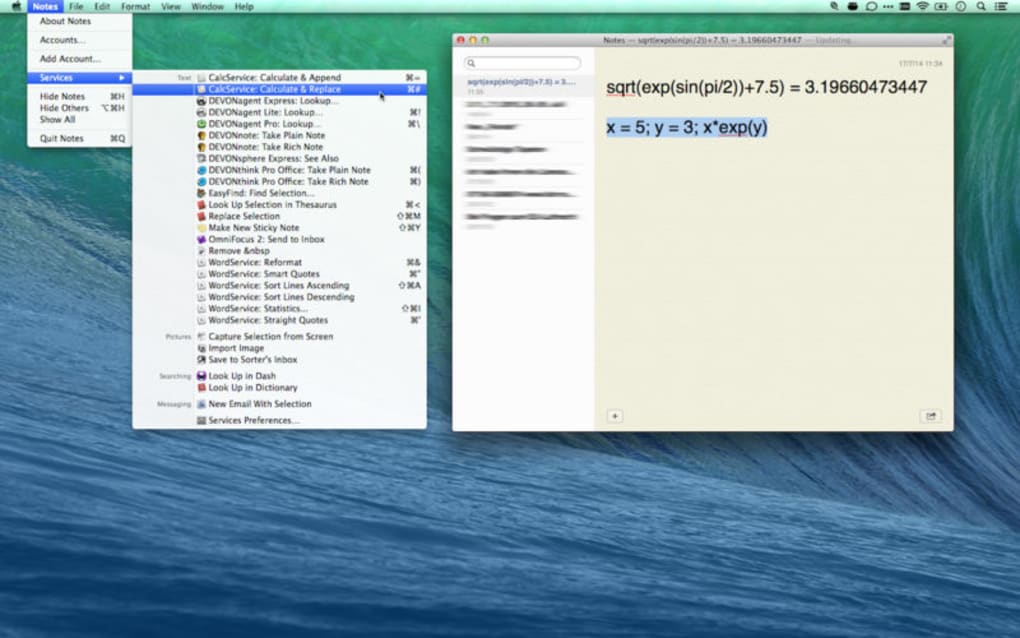
CalcService is a lightweight, free digital in‑line text‑based calculator that re‑imagines the way we perform everyday math. Unlike traditional calculators that require you to switch between windows or apps, CalcService lets you embed calculations directly within any text field—whether you’re drafting an email, writing a report, or chatting in a messenger. Simply type the equation surrounded by brackets or a special trigger, press a single keystroke, and the answer instantly replaces the expression.
The tool occupies just 649.8 KB of memory, making it ideal for low‑spec devices and ensuring fast start‑up times. Built with security and privacy in mind, CalcService runs locally without sending any data to the cloud, guaranteeing that your numbers stay confidential. Whether you’re a student crunching homework, a professional handling invoices, or a programmer testing quick formulas, CalcService delivers a seamless, secure, and ultra‑fast calculation experience across Windows, macOS, Android, and iOS platforms.
Core Features
- In‑Line Calculation Engine: Enter equations directly within any text area and get results with a single keystroke.
- Cross‑Platform Support: Native apps for Windows, macOS, Android, and iOS ensure a consistent experience on desktops and mobile devices.
- Minimal Resource Footprint: Only 649.8 KB of memory is required, keeping your system responsive even on older hardware.
- Secure Local Processing: All calculations are performed locally; no data is transmitted to external servers.
- Rich Syntax Recognition: Supports basic arithmetic, parentheses, exponents, percentages, and common scientific functions.
- Customizable Triggers: Choose your preferred key combination (e.g., Ctrl + Enter or a dedicated “Calculate” button) to execute the calculation.
- Auto‑Update Mechanism: Free automatic updates keep the calculator current with the latest bug fixes and feature enhancements.
- Clipboard Integration: Copy results instantly to the clipboard for easy pasting into other applications.
- Lightweight UI: A clean, unobtrusive interface that can be toggled on or off based on your workflow needs.
- Multi‑Language Support: Available in English, Spanish, French, German, and more, with easy language switching.
Installation & Usage Instructions
Getting CalcService up and running is straightforward, regardless of your operating system. Windows users can download the installer from the official website, run the .exe file, and follow the on‑screen wizard. The installer automatically creates a desktop shortcut and adds CalcService to the system tray for quick access.
macOS users should download the .dmg package, drag the CalcService icon into the Applications folder, and launch it from Launchpad. For Android, open the Google Play Store, search for “CalcService,” tap “Install,” and grant the necessary permissions to overlay on other apps. iOS users can find the app in the App Store, install it with a single tap, and enable “Keyboard Extension” in Settings to use the calculator directly within any text field.
Once installed, activation is as simple as typing an expression within square brackets, for example [12 + 7 × 3]. Press the configured trigger (default: Ctrl + Enter on desktop, a floating “=“ button on mobile) and the bracketed text is instantly replaced with the computed result, e.g., 33. The app also offers a small overlay window that can be summoned with Alt + C (Windows) or a swipe gesture (mobile) for quick one‑off calculations. Users can customize the trigger keys, decimal precision, and display format from the Settings menu, which is accessible via the system tray icon or the app’s main screen. All preferences are saved locally, ensuring a consistent experience each time you launch CalcService.
For power users, CalcService includes a “History” panel that logs the last 50 calculations, allowing you to revisit and reuse previous results. The history can be exported as a CSV file for record‑keeping or imported back into the app if needed. Additionally, the “Script Mode” lets you write multiple lines of calculations separated by semicolons, perfect for batch processing simple financial models or statistical formulas without leaving your text editor.
Compatibility, Pros & Cons
CalcService is built with native frameworks to ensure full compatibility across the major operating systems:
- Windows 10, 11 (64‑bit): Supports both Intel and ARM architectures.
- macOS Catalina (10.15) and later: Optimized for Apple Silicon and Intel Macs.
- Android 7.0 (Nougat) and later: Works on smartphones, tablets, and Chrome OS devices.
- iOS 13 and later: Fully functional on iPhone, iPad, and iPod Touch.
Pros
- Zero‑cost, completely free to download and use.
- In‑line calculation eliminates context‑switching and boosts productivity.
- Extremely small footprint (under 1 MB) ensures fast load times.
- All processing is local, guaranteeing privacy and security.
- Cross‑platform availability lets you stay consistent across devices.
- Highly customizable triggers and display options.
- Automatic updates keep the software current without manual intervention.
- Supports a wide range of mathematical functions and syntax.
Cons
- Advanced scientific functions (e.g., matrix operations) are not yet supported.
- No cloud‑sync for history; data is stored locally per device.
- Limited theming options; UI is primarily light mode.
- Keyboard shortcut configuration is currently limited to preset combinations.
- Requires internet connection for initial download of language packs.
Frequently Asked Questions & Conclusion
Is CalcService really free?
Yes, CalcService is completely free. There are no hidden fees, subscription plans, or in‑app purchases. The developers fund the project through optional donations.
Can I use CalcService offline?
Absolutely. All calculations are performed locally on your device, so you do not need an internet connection after the initial installation.
Which mathematical functions are supported?
CalcService handles basic arithmetic, exponents, roots, percentages, trigonometric functions (sin, cos, tan), logarithms, and common statistical operations such as mean and median. More advanced functions are slated for future updates.
How do I change the calculation trigger key?
Open the Settings menu (accessed via the system tray icon or the app’s main screen), navigate to “Keyboard Shortcuts,” and select a new key combination from the dropdown list. Save changes and the new trigger will take effect immediately.
Is my data safe when using CalcService?
Yes. Since all calculations are processed locally, no personal or calculation data is transmitted to external servers. The app does not collect telemetry unless you opt‑in to anonymous usage statistics.
In summary, CalcService delivers a unique, secure, and ultra‑lightweight solution for anyone who needs fast, in‑line calculations without leaving their current workflow. Its zero‑cost model, cross‑platform support, and privacy‑first design make it a compelling addition to both personal and professional toolkits. Ready to boost your productivity? Download CalcService now and start calculating instantly—no registration, no hassle.







